Turn Signal and Multifunction Switch Assembly - Assemble - Off Vehicle for Chevrolet S10 - Electric 1999
Turn Signal and Multifunction Switch Assembly - Assemble - Off Vehicle Column Shift
- Install the turn signal and multifunction switch assembly (2) onto the steering column tilt head assembly.
- Screw the 2 pan head tapping screws (1) into the turn signal and multifunction assembly (2).
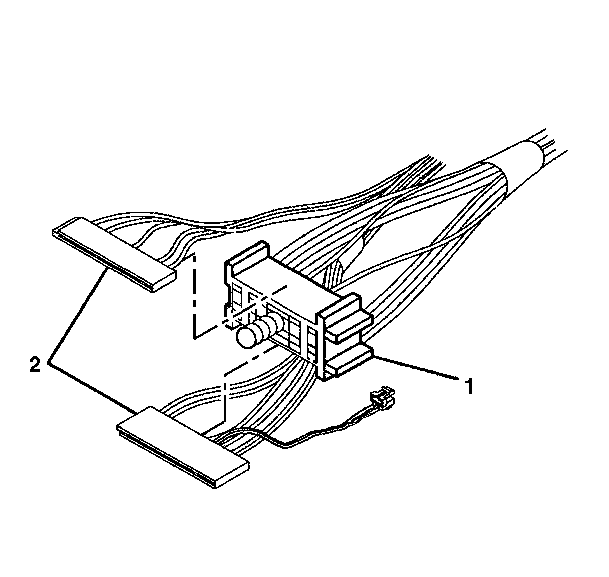
- Slide the 2 connectors (2) of the turn signal and multifunction switch assembly into the bulkhead connector (1).
- Reconnect the turn signal and multifunction switch assembly connector to the inflatable restraint steering wheel module coil connector.
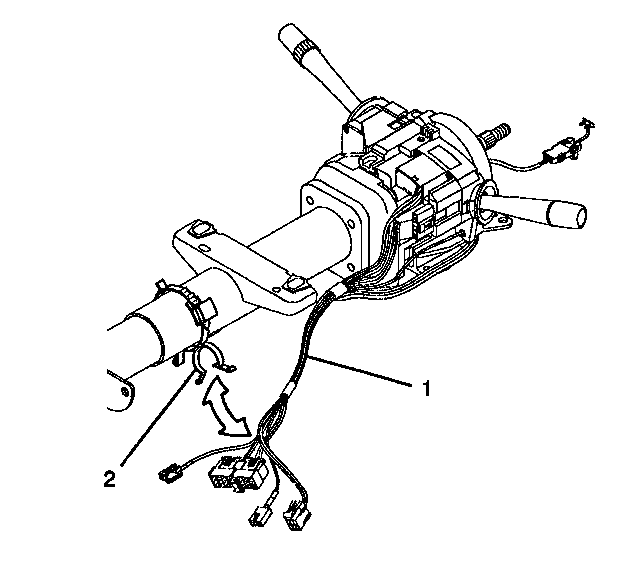
- Attach the wire harness assembly (1) to the steering column wire harness strap (2).
- Install the upper and lower trim covers. Refer to Trim Covers, Shift Lever Seal - Assemble - Off Vehicle .
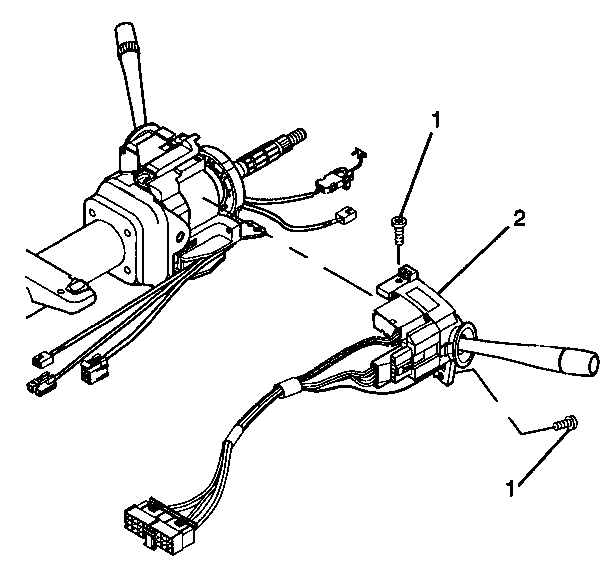
Important: The electrical contact of the turn signal and multifunction switch assembly (2) must rest on the turn signal cancel cam assembly.
Notice: Use the correct fastener in the correct location. Replacement fasteners must be the correct part number for that application. Fasteners requiring replacement or fasteners requiring the use of thread locking compound or sealant are identified in the service procedure. Do not use paints, lubricants, or corrosion inhibitors on fasteners or fastener joint surfaces unless specified. These coatings affect fastener torque and joint clamping force and may damage the fastener. Use the correct tightening sequence and specifications when installing fasteners in order to avoid damage to parts and systems.
Tighten
Tighten the 2 pan head tapping screws to 7 N·m (62 lb in).