Inflatable Restraint Side Impact Sensor Replacement for Chevrolet SSR 2006
Removal Procedure
- Disable the SIR system. Refer to SIR Disabling and Enabling and SIR Disabling and Enabling .
- Remove the front door trim panel. Refer to Door Trim Panel Replacement in Doors.
- Peel the rear half of the water deflector away from the door in order to access the side impact sensor.
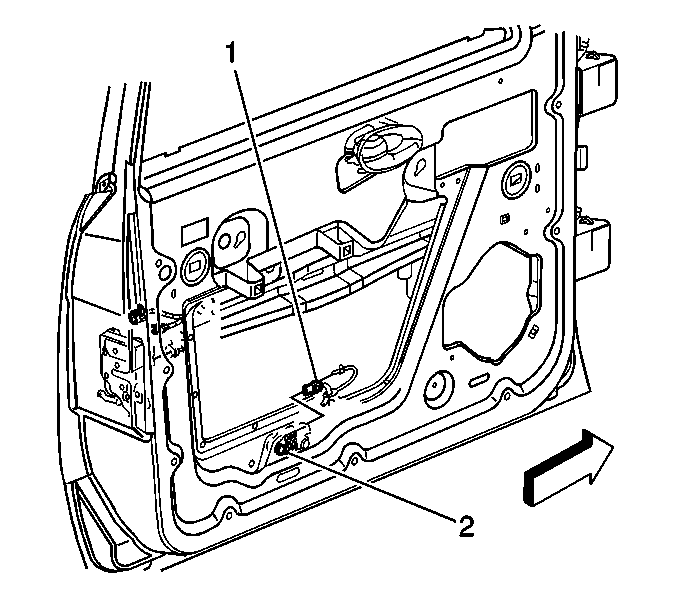
- Remove the screws that retain the side impact sensor (2) to the door.
- Disconnect the impact sensor electrical connector (1) from the side impact sensor.
- Remove the side impact sensor from the door.
Caution: Refer to SIR Caution in the Preface section.
Caution: Do not strike or jolt the inflatable restraint side impact sensor (SIS). Before applying power to the SIS make sure that it is securely fastened. Failure to observe the correct installation procedures could cause SIR deployment, personal injury, or unnecessary SIR system repairs.
Installation Procedure
- Remove any dirt, grease, or other impurities from the mounting surface.
- Position the side impact sensor (2) horizontally to the door.
- Connect the electrical connector (1) to the side impact sensor (2).
- Install the screws which retain the side impact sensor to the door.
- Fully seat the water deflector to the door.
- Install the door trim panel. Refer to Door Trim Panel Replacement in Doors.
- Enable the SIR system. Refer to SIR Disabling and Enabling and SIR Disabling and Enabling .
Notice: Use the correct fastener in the correct location. Replacement fasteners must be the correct part number for that application. Fasteners requiring replacement or fasteners requiring the use of thread locking compound or sealant are identified in the service procedure. Do not use paints, lubricants, or corrosion inhibitors on fasteners or fastener joint surfaces unless specified. These coatings affect fastener torque and joint clamping force and may damage the fastener. Use the correct tightening sequence and specifications when installing fasteners in order to avoid damage to parts and systems.
Tighten
Tighten the screws to 8 N·m (71 lb in).
