Crankshaft Position Sensor Replacement for Chevrolet Tracker - 4WD 2003
Removal Procedure
- Disconnect the electrical connector from the crankshaft position (CKP) sensor .
- Remove the transmission from the vehicle.
- Remove the flywheel or the flex plate from the crankshaft.
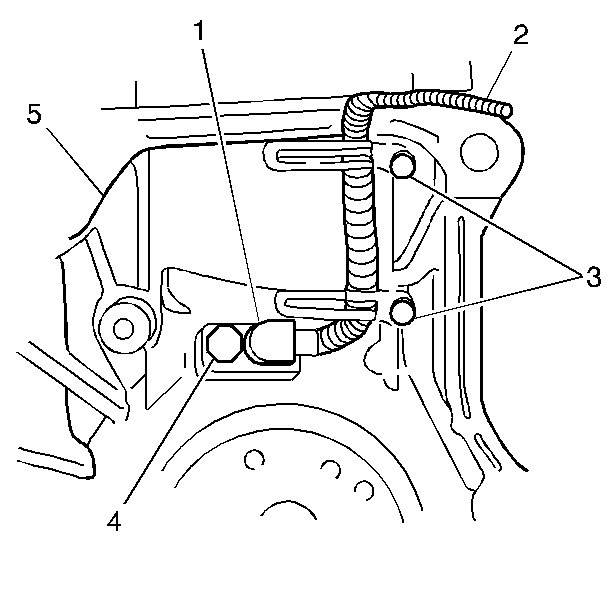
- Remove the 2 bolts (3) and the sensor wire harness clips or shield.
- Remove the bolt (4) securing the CKP sensor to the engine block (5).
- Remove the CKP sensor (1) and the wire harness (2) from the vehicle.
- Inspect the CKP sensor signal rotor for damaged or missing teeth through the CKP sensor opening.
Installation Procedure
Notice: Do not pinch or damage the CKP sensor wire harness between the engine block and transmission during the transmission installation. Observe that the CKP sensor wire harness remains properly located in the channel provided at the rear of the engine block during the installation.
- Lubricate the CKP sensor O-ring with clean engine oil.
- Install the CKP sensor (1) to the engine block (5).
- Secure the CKP sensor to the engine block with the bolt (4).
- Secure the sensor wire harness to the engine block with the clips or the shield and the 2 bolts (3).
- Install the crankshaft flywheel or flex plate.
- Install the transmission.
- Connect the CKP sensor electrical connector.
Notice: Use the correct fastener in the correct location. Replacement fasteners must be the correct part number for that application. Fasteners requiring replacement or fasteners requiring the use of thread locking compound or sealant are identified in the service procedure. Do not use paints, lubricants, or corrosion inhibitors on fasteners or fastener joint surfaces unless specified. These coatings affect fastener torque and joint clamping force and may damage the fastener. Use the correct tightening sequence and specifications when installing fasteners in order to avoid damage to parts and systems.
Tighten
Tighten the bolt to 6 N·m (54 lb in).
