For 1990-2009 cars only
Front Seat Cushion Cover and Pad Replacement for Pontiac Bonneville 2000
Removal Procedure
- Disable the SIR system. Refer to Disabling the SIR System in SIR.
- Remove the seat cushion. Refer to Front Seat Cushion Replacement .
- Disconnect the seat cushion cover J channels from the seat cushion frame.
- Remove the lumbar support knob, if equipped. Refer to Lumbar Support Knob Replacement .
- Remove the power seat switch. Refer to Power Seat Switch Replacement .
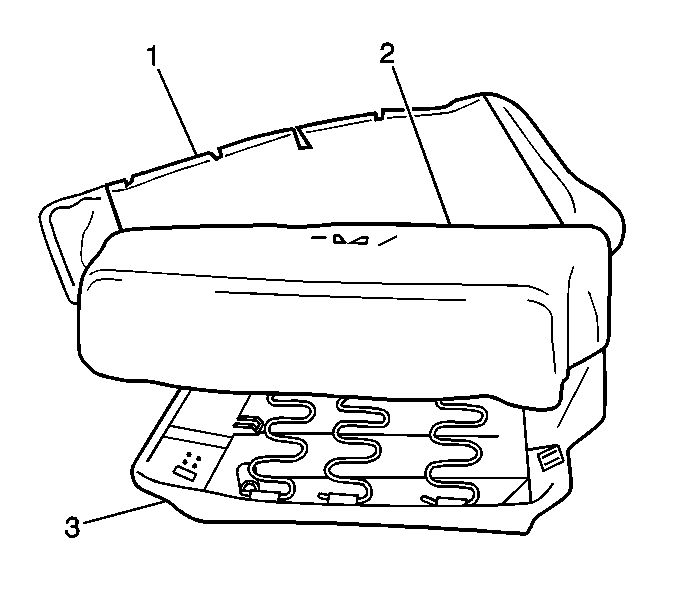
- Remove the seat cushion cover (1).
- Remove the seat cushion pad (2).
Caution: When you are performing service on or near the SIR components or the SIR wiring, you must disable the SIR system. Refer to Disabling the SIR System. Failure to follow the correct procedure could cause air bag deployment, personal injury, or unnecessary SIR system repairs.
Installation Procedure
- Install the seat cushion pad (2) to the seat cushion frame (3).
- Install the seat cushion cover (1) over the seat cushion pad (2).
- Install the power seat switch. Refer to Power Seat Switch Replacement .
- Install the lumbar support knob, if equipped. Refer to Lumbar Support Knob Replacement .
- Install the seat cushion cover J channels to the seat cushion frame.
- Install the seat cushion to the front bucket seat. Refer to Front Seat Cushion Replacement .
- Enable the SIR system. Refer to Enabling the SIR System in SIR.
