For 1990-2009 cars only
Rear Window Shelf Trim Panel Replacement for Pontiac Grand Am 2003
Tools Required
J 38778 Door Trim Pad Clip Remover

Removal Procedure
- Remove the rear seat cushion. Refer to Rear Seat Cushion Replacement in Seats.
- Remove the stationary seat back, if equipped. Refer to Rear Seat Back Replacement in Seats.
- Remove the split folding seat back, if equipped. Refer to Rear Seat Back Replacement in Seats.
- Remove the lower quarter trim panel. Refer to Rear Quarter Lower Trim Panel Replacement .
- Remove the upper quarter trim panel. Refer to Rear Quarter Upper Trim Panel Replacement .
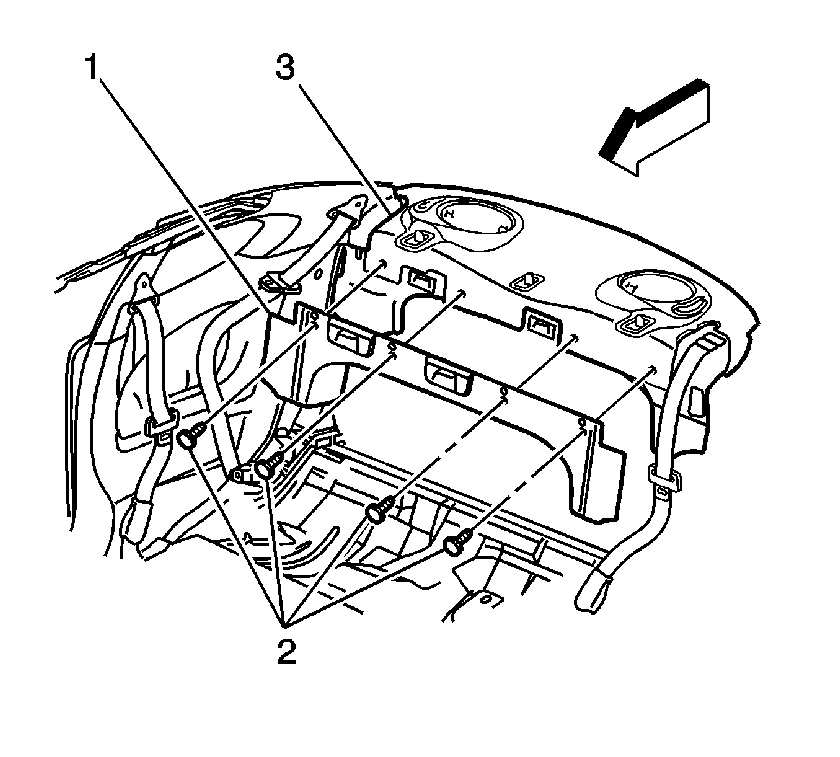
- Using J 38778 remove the push in retainers (2) from the rear compartment closeout trim panel (1). If the vehicle is equipped without a closeout panel (1) remove the push in retainers (2) from the rear window trim panel (3).
- Remove the rear compartment closeout panel (1), if equipped.
- Lift up the front of the trim panel (3).
- With the front of the trim panel (3) lifted up, slide the panel forward in vehicle to remove from the rear shelf.
Installation Procedure
- Align the trim panel (3) to the rear shelf.
- With the front of the trim panel (3) lifted up, slide the panel (3) rearward in vehicle to install to the rear shelf.
- Press down on the front of the trim panel (3).
- Install the closeout panel (1), if equipped.
- Install the push in retainers (2) to the closeout trim panel (1). If vehicle is equipped without a closeout trim panel (1) install the push in retainers (2) to the window trim panel (3).
- Install the quarter upper trim. Refer to Rear Quarter Upper Trim Panel Replacement .
- Install the quarter lower trim. Refer to Rear Quarter Lower Trim Panel Replacement .
- Install the split folding seat back, if equipped. Refer to Rear Seat Back Replacement in Seats.
- Install the rear seat back, if equipped. Refer to Rear Seat Back Replacement in Seats.
- Install the rear seat cushion. Refer to Rear Seat Cushion Replacement in Seats.
